Today Active Directory Security is mission-critical to organizational security worldwide and thus mission-critical to Cyber Security worldwide. On this blog, former Microsoft Program Manager for Active Directory Security, and today, CEO of Paramount Defenses, shares valuable technical insights on Active Directory Security.


Showing posts with label Access Privileges in Active Directory. Show all posts

Monday, February 24, 2020

Bloodhound for Active Directory : Bloody Inaccurate

Folks,

As former Microsoft Program Manager for Active Directory Security, and today as CEO of Paramount Defenses, my time is EXTREMELY valuable, so I don't have too much time for blogging etc. but I wanted to make a very important point today.


Bloodhound for AD

There's a tool out there called Bloodhound for AD (Active Directory) and its designed to be able to analyze an organization's Active Directory security permissions and find privilege escalation paths leading to all-powerful privileged AD accounts.


Over the years, its gained a lot of attention, and from what I'm told, today hundreds of thousands, if not millions, of Red and Blue Teamers worldwide use Bloodhound to find privilege escalation paths in Active Directory deployments.

In fact, these days even $ 10 B cyber security companies like CrowdStrike write about Bloodhound, as can be seen here; sadly, when they do so, all they do is show the whole wide world just how little they too know about Active Directory Security.


Bloodhound for AD - Bloody Inaccurate 

Folks, please pardon my French but when someone can design a tool to exploit weaknesses in Active Directory deployments, which could then be used to harm organizations, and call it Bloodhound, then I hope its designers and the world won't mind it if I could accordingly use the word BLOODY in pointing out just how INACCURATE this tool actually is.


I've personally tested Bloodhound, and in less than two minutes, I was able to determine that it is not accurate. I spent fifteen more minutes testing several advanced factors involved in Active Directory security, and it seemed to fail virtually all of them.

In less than 15 minutes, I was able to factually (technically) determine that Bloodhound's results were far from being accurate.


Details and Proof

I've invested almost twenty years of life in being the best in the world at Active Directory Security, so I'm NOT about to provide FREE feedback to whoever built this tool to help them make it accurate, because conceptually this tool empowers bad guys to exploit weaknesses and take out good guys. I'd encourage them to work harder to learn more, and figure it out on their own.

I'll share the ESSENCE of what makes it bloody inaccurate - it does not take THIS one essential technicality into account.

That said, to anyone who may want proof that Bloodhound is inaccurate, all one has to do is compare its output on even just a few core test cases, with the output of the world's only accurate Active Directory privileged access audit tool, Gold Finger.


Gold Finger for AD - The GOLD Standard

Even after a decade, there's still just only one tool on planet Earth that can ACCURATELY determine privileged access in Active Directory, based on the accurate determination of effective permissions, and it is the world's ONLY accurate privileged access audit tool for Microsoft Active Directory - the Microsoft-endorsed Gold Finger.


Over the last decade, from the United States Department of Defense to the United States Treasury, the world's most powerful and important government and business organizations across six continents worldwide have used and trusted Gold Finger to make these paramount determinations in their foundational Active Directory deployments.

Gold Finger includes the world's best Active Directory ACL Analyzer, ACL Exporter, Permissions Analyzer, the world's only accurate Active Directory Effective Permissions Calculator, the world's only accurate Active Directory Effective Access Auditor, AND most importantly, the world's only accurate, fully-automated, domain-wide Privileged Access Auditor for Active Directory.


Now, unlike those who built Bloodhound and made it available for free, we do NOT license Gold Finger to individuals ; we only license it to legitimate organizations, and only for use in their own Active Directory deployments, for a very simple reason.

The reason very simply is that the information that Gold Finger can uniquely determine and reveal can ACTUALLY be used to either protect and lock down or compromise and take down entire $ Billion/Trillion companies, all within a matter of minutes.


A Much Bigger Problem

From a technical standpoint, its hard to have an issue with its concept, as it seems to be a penetration testing tool that seeks to identify exploitable privilege escalation paths leading to Domain-Admin equivalent privileged accounts in Active Directory.

What amazes me and should amaze everyone is that even with its limited accuracy, based on its ability to take basic factors into account, those using it can still easily find so very many privilege escalation paths in almost any Active Directory deployment.


There's a MUCH bigger problem here, which is that even today, 99% of organizations operating on Active Directory, either do not know enough about Active Directory Security to care to lock it down, or that they do not know how to correctly audit and lockdown privileged access in their Active Directory, as a result of which they all remain massively vulnerable.

That is a far more concerning problem than a tool like this, because this is merely one tool. Proficient hackers could easily write their own tools to identify and exploit such privilege escalation paths in Active Directory, AND until organizations accurately identify and lockdown privileged access in their Active Directory, they will remain substantially exposed to compromise.


Time's Up

That's it. That's all the time I had for this. I'll end on this - just because millions of people use something doesn't mean it is either accurate ; it just means that these millions of people TOO may not yet know enough (or at all) about Active Directory Security.

Best wishes,
Sanjay.


PS: If you want to learn Active Directory Security, reading the contents of the list in this 1 post alone is a good place to start.

Wednesday, December 27, 2017

How to Easily Solve the Difficult Problem of Active Directory Botnets


Folks,

The year's almost coming to an end, and I just realized that one of the topics that I had not yet addressed as a part of my basic Active Directory Security School for Microsoft was this inane topic of Active Directory Botnets so today's post is on AD Botnets.

There's less than 100 hours left this year, and I value every minute, so this one's going to be short, yet sufficient.


Active Directory Botnets


Earlier this year, one of the two presentations on Active Directory Security at the famous Black Hat Conference USA 2017 was titled - The Active Directory Botnet. (The other one was An ACE Up the Sleeve - Designing Active Directory ACL Backdoors.)

Both of these presentations seem to have gotten a lot of attention, and as to the presentation on Active Directory Botnets, its authors said that this is (and I quote) "a nightmare of an implementation error with no easy fix!"


Well, today I'll show you just how easy it is to solve/fix this supposedly difficult problem :-)

In today's post, I am not going to go into the details of how attackers could set up these botnets because my focus is on helping organizations eliminate the very possibility of this issue, so if you're interested in the technical details, here are a few pointers -
  1. The slides of the presentation titled The Active Directory Botnet that was made at the Black Hat Conference 2017
  2. A video of the presentation titled The Active Directory Botnet that was made at the Black Hat Conference 2017
  3. A short interview with the presenters of this presentation.

Since my purpose is on helping organizations mitigate this issue, I'm going to focus on the mitigation aspect.


What Makes This Possible

In order to find out how to easily mitigate this issue, it helps to first understand what makes this issue possible in the first place.

Here's the short of what makes this all possible  -


As you may know, Active Directory, being the very foundation of cyber security in a Microsoft Windows Server network, stores and protects the entirety of an organization's domain user accounts, security groups, computer accounts, security policies etc.

As you may also know, in Active Directory literally everything is an object, and an object is essentially a collection of numerous attributes, as defined in the Active Directory Schema. So for example, there exist attributes for elements such as a user's first name, last name, password, manager, contact details, address details, user profile, a picture etc. etc.

Further, Active Directory's powerful security/delegation model makes it very easy for IT personnel to provision access in Active Directory for various stakeholders, to fulfill business needs wherein these stakeholders may need to be able to modify any of these fields/attributes. For example, if an HR application may have a need to change the Manager field/attribute on user accounts, such access can be very easily and precisely delegated for that HR application's service account.

Now, it turns out that by default, Active Directory also lets all domain user account holders modify certain fields/attributes on their own domain user accounts. Examples of such fields/attributes include Address, Assistant, Personal-Title, Phone-Home-Other, Phone-Ip-Other, Picture, Street-Address, WWW-Home-Page  etc. to name a few.

These attributes could store values of various data-types, so for instance, while some could simply and solely store a text string, others could store a distinguished name, and still others could store binary data. An example of an attribute that can solely store a text value is Surname and an example of an attribute that can store binary data is Picture.

Finally, to simplify access control, numerous such related fields/attributes can be aggregated together into an Active Directory construct known simply as a Property-Set.

Examples of Active Directory Property Sets include Personal Information, Private Information, Web Information, etc.


Tying all of the above together, in the access control list (ACL) of every domain user account, by default there are explicit access control entries (ACEs) that grant the security principal Personal Self, the ability to modify the Personal Information, Phone and Mail Options and Web Information property sets. Since the Personal Self  security principal on an Active Directory user object maps to the domain user account itself, the presence of these security permissions provides sufficient effective access to the domain user account holder to be able to modify all the attributes that are members of these property sets!

Now, imagine a scenario wherein the computer onto which this domain user account usually logs on has been compromised. In that scenario, the attacker could now have malicious code run in the security context of this domain user account, and if so, then one of the things that malicious code could do is update these attributes on the user's domain user account! 

In such a scenario, how the attacker chooses to use this default ability to update these attributes in Active Directory is purely a function of his/her imagination, and it so happens that in this particular case, the presenters of that specific presentation at Black Hat came up with a scenario wherein attackers could choose to use this default access granted to domain user accounts to introduce and operate Botnets in Active Directory environments!


How to Easily Solve the Supposedly Difficult Problem of
Active Directory Botnets -

According to the authors of this presentation, this is (and I quote) "a nightmare of an implementation error with no east fix!

If you ask me, I'll tell you "this is an issue that can be mitigated in minutes, and here's how" -


All that organizational IT personnel need to do is write a simple script whose purpose is simply to remove those explicit ACEs in the ACLs of domain user accounts in an Active Directory that grant the Personal Self security principal Write-Property permissions to the involved property sets.

Specifically, here are the three explicit ACEs that you may want to remove -
  1. { Allow   SELF   Read/write personal information }
  2. { Allow   SELF   Read/write phone and mail options }
  3. { Allow   SELF   Read/write web information }

Such a script can be written and be executed within minutes, and once it has been executed, there should no longer* be any ACEs in the ACLs of the organization's domain user accounts that would allow these domain user accounts the ability to modify these attributes on their own objects, and as a consequence, perpetrators will no longer be able to leverage this default modify access in Active Directory, resulting in a situation where this issue would no longer be an issue at all, since the underlying enabler of this issue would have been eliminated!
* Kindly see sections titled A Caveat and An Advanced Tip below

It really is as simple as this! That's it!


Now, some might ask - "But wouldn't this impact the ability to users to modify such attributes in Active Directory and/or cause potential application compatibility issues if certain apps were relying on this default access to properly function today?!"

The answer to that question is that realistically speaking, domain user accounts holders should not ideally possess any level of modify access in the Active Directory, and most likely no default applications should be relying on this default access granted to domain user accounts to function, so the application compatibility impact of making this change could be none to minimal.
Disclaimer: Organizations know their unique Active Directory environments best, so before acting on this advice, organizations will want to ensure that there in fact are no Active Directory integrated applications or business use-cases that leverage this default modify access granted to domain users on their accounts. This advice is provided on a best-efforts basis and your use of it is subject to our Terms of Use.

That's literally all there is to it, and that is literally how easy it is to solve this inane problem!


One Caveat

There is ONE caveat that could possibly still enable a perpetrator to still try and leverage the limited write-property access that might remain even after you remove each one of those explicit ACEs that grant SELF modify access to those property sets.

Here's the caveat - at the domain root, there is an inheritable permission specified that is inherited by all objects, including all user objects, and it grants SELF the ability to read and write the Private Information property set -  { Allow   SELF   Special }


Members of the Private Information property-set include* - 
  1. ms-PKI-Credential-Roaming-Tokens
  2. MS-PKI-RoamingTimeStamp
  3. MS-PKI-DPAPIMasterKeys
  4. MS-PKI-AccountCredentials
* This property-set has the above four members in Windows Server 2008 R2 and beyond.


As a result, theoretically speaking, a perpetrator could possibly try to use these attributes to achieve the same mal-effect.

However, in practice, should the system be using these attributes, then any values that the perpetrator might write into these attributes will likely get overwritten by whatever the system writes into them, thus in practice rendering that option infeasible.

Of course, if you know for a fact that these attributes are not being used in your environment, then you can simply remove this ACE from the domain root, which will then have the effect of it being removed from all domain user accounts as well.
Disclaimer: Organizations know their unique Active Directory environments best, so before acting on this advice, organizations will want to ensure that there in fact are no Active Directory integrated applications or business use-cases that leverage this default modify access granted to domain users on their accounts. This advice is provided on a best-efforts basis and your use of it is subject to our Terms of Use.


An Advanced Tip

Those who know the subject well know that even if each one of these ACEs no longer exist, a user could still possibly have sufficient effective permissions so as to be able to modify one or more attributes on the domain user account, should there be other permissions in the ACL of the account that might effectively grant the user sufficient effective access so as to be able to do so. The only way to correctly find out whether or not a user can in fact still modify attributes on his/her domain user account is by accurately determining Active Directory effective permissions on that domain user account.

Gold Finger Active Directory Effective Permissions Calculator

For instance, in the snapshot above, one can see that on the domain user account of a user, Jeff Bezos, the user Jeff Bezos still has write-property effective permissions to the Phone-Ip-Other attribute (which is a member of the Personal Information property-set), and he has this access on his own account not by virtue of those SELF ACEs but in fact by virtue of the fact that there exists an ACE that grants the IT Cloud DevOps Team domain security group, of which he is a member, Write-Property information to the Personal Information property set.

The likelihood of this is low, yet in the interest of completeness, since it is always a possibility, I felt the need to mention this, and security conscious organizations will want to take Active Directory Effective Permissions into account for completeness.


Summary

Today, I just wanted to take a few minutes to share with you just how easily organizations worldwide can solve this supposedly difficult problem of Active Directory Botnets! Of all the problems I've helped solve this year, this one was by far the easiest.


The short of it is that this inane issue can be mitigated within minutes by simply using basic scripting to remove the very ACEs that grant domain user accounts the ability to modify the attributes that this attack vector leverages. It really is as simple as that!

I apologize if this post was short and to the point. I usually spend a lot more time on my posts, but its almost the end of the year, and my time is very valuable, so I decided to keep it short. Besides this is so easy, that it only needed minutes to address.

Best wishes,
Sanjay

Friday, December 1, 2017

How to Discover Stealthy Admins in Active Directory

Folks,

Today, I wanted to take a few minutes to share how organizations worldwide can discover stealthy admins in Active Directory.


This is part II of the post - How to Discover Stealthy Admins in Active Directory.


A Quick Intro

Lately Active Directory Security seems to have been getting a lot of attention from traditional network security / hacking / cyber security folks, both, on the good side and the not-so-good side. Many of them may be relatively new to the subject of Active Directory Security, and most of them seem to be primarily interested in identifying privileged users in Active Directory.


Interestingly, perhaps because they may be new to this ocean of a subject, they may have started referring to delegated admins in Active Directory as Stealthy Admins, perhaps because they may not be aware of the concept of access provisioning and administrative delegation in Active Directory, even though both these concepts have been around for 17 years now.

If you want to know what I think of the term Stealthy Admins, you can read my last post on this topic ;-)

Anyway, to help these folks, and anyone else who might be interested in discovering "Stealthy Admins in Active Directory", I thought I'd help them understand what it actually takes to correctly make this determination in Active Directory deployments.


A Quick Primer

It is no secret that in IT infrastructures that are powered by Microsoft Windows Server, the proverbial "Keys to the Kingdom" lie in Active Directory. Specifically, the most powerful administrative/privileged domain security groups (e.g. Domain Admins), as well as the domain user accounts of all their members are all stored, protected and managed in Active Directory.


Now, if you were to ask a novice for advice on how to identify privileged users in an Active Directory, he/she will most likely tell you that all you would have to do is identify all those domain security groups that Microsoft says are privileged in nature, and then enumerate the complete membership of these domain security groups, and that's it i.e. you should be done!

Interestingly, would you be surprised if I shared with you that a majority of all organizations worldwide, when asked to furnish a list of privileged users in their Active Directory deployments (to demonstrate regulatory compliance that is), do exactly this!

In reality, if you follow the advice above, you would have merely uncovered the Tip of the Iceberg, because in reality, in most organizations, there exist a FAR greater number of privileged users than do the members of the default AD admin groups.


A Quick Question

To understand where Stealthy Admins come from in Active Directory, let us ask ourselves a quick very simple question.
Assumption: For illustrative purposes, let us assume for a moment, that there is only one default administrative/privileged group in Active Directory - the Domain Admins security group.

Here's the Domain Admins group, and the question is below -


As you can see above, there are only 2 members in the Domain Admins group.

The Question - Based on the above, can we assume that this organization only has 2 privileged users in their Active Directory? i.e. there are only 2 accounts that possess privileged access in this Active Directory - 1) the default Administrator account, and 2) the domain user account of the user Steve Ballmer, as that is what the membership of the Domain Admins group indicates?

Side Note: Would you be surprised if I told that (considering the assumption we've made above) most organizations would just report this as the number or privileged users in Active Directory?!

To answer this question, let us consider the following.


Consider This

Consider the impact of someone being able to perform the following administrative tasks in Active Directory -


  1. Change the membership of the Domain Admins group

  2. Reset the password of the domain user account of a member of the Domain Admins group

  3. Change the permissions on the Domain Admins group, or on the account of any of its members

  4. Change the ownership of the Domain Admins group, or on the account of any of its members

The above is most certainly not an exhaustive list of such administrative tasks, but merely a handful of such administrative tasks that can be enacted on Active Directory content, by anyone that has sufficient effective access to be able to do so.

Note: At this point, to advanced users, AdminSDHolder may come to mind. I would encourage them to read this advanced post on AdminSDHolder, and if you want to know how little even Microsoft seems to know, this one too.

Specifically, consider this -

Although in the illustrative example above, the Domain Admins group only has 2 members, shouldn't everyone who can change its membership also be considered a Domain Admin? After all, anyone who could do so could easily and instantly add his/her own account, or that of anyone he/she likes, to the group, as well as take the existing members out of the group!

Similarly, in the illustrative example above, although we only have 2 accounts that are members of the Domain Admins group, shouldn't everyone who can reset the password of any of these accounts also be considered a Domain Admin? After all, anyone who could do so could easily reset the password of these admin accounts, and instantly logon as them!

By the same token, anyone that can change the permissions or the ownership of any one of these default administrative groups or accounts should also be considered to be a privileged user possessing the same level of privilege, because he/she could easily modify the permissions on these objects to grant themselves or anyone else the same level of administrative privilege!


The Answer (to the Question)

In light of what we just considered above, hopefully it should now be clear that to accurately identify privileged users in Active Directory, in addition to enumerating the members of the default administrative/privileged security groups in Active Directory, at the very least, we should also be determining and including exactly -
  1. Who can change the membership of every single domain security group (as well as any domain security groups nested in it) in Active Directory that is considered administrative/privileged in nature? 

  2. Who can reset the password of every single domain user account that is a member of a domain security group that is considered to be administrative/privileged in nature?

  3. Who can modify the security permissions and/or the ownership of every single domain security group and domain user account that is considered to be administrative/privileged in nature?

It must be noted that the keyword here is "at the very least." I say so because there could additionally easily be a specific domain user account or a domain security group that may not be a member of any default privileged group in Active Directory yet be directly be granted access in Active Directory that is tantamount to possessing privileged access in Active Directory!


Now, in case you're wondering - "But how does someone get the ability to change group memberships, reset passwords, etc?!"


Delegation of Administration in Active Directory

This brings us to one of the most powerful, capable, valuable and frequently-used features/strengths of Active Directory - Administrative Delegation. Delegation of administration is a capability that lets organizations distribute and delegate administrative authority for various aspects of identity and access management amongst a large group of IT personnel.

Its premise is simple - since it may be infeasible for a handful of highly privileged Domain Admins to manage thousands of objects in AD, wouldn't it be helpful if organizations could delegate/distribute administrative authority for identity and access management tasks amongst a larger group of IT personnel, who need not posses Domain Admin equivalent privileges!

Delegation of administration lets organizations delegate administrative authority in Active Directory and do so with precision -


In fact, over the last 17 years, there possibly might have been billions of administrative delegations / access provisioning(s) done in Active Directory domains, across Active Directory deployments worldwide.

Incidentally, I only know this because I happened to have authored Microsoft's 400-page whitepaper on the subject back in 2004 titled "Best Practices for Delegating Administration in Active Directory". The appendices of that whitepaper in itself were a treasure trove of knowledge on the subject. Amazingly, that whitepaper's nowhere to be found on microsoft.com these days!

Now, this is a very complicated subject (considering that it required a 400-page whitepaper to cover) so I'm not going to go into too many details here. Instead, I just wanted to share with you how IT personnel end up getting sufficient privileges in Active Directory so as to be able to enact common administrative tasks such as group membership changes, password resets etc.


The short of it is that when a task is delegated to a specific security principal, such as a domain security group, the security permissions required to perform the technical LDAP operation that corresponds to that task on a given type of object, are provisioned in Active Directory, thereby enabling all members of that group to be able to enact that task.

For example, when a domain security group such as IT Operations Support Level 1 is delegated the administrative task "Modify the membership of a group" in a specific organizational unit (OU), the following security permissions are added to the ACL of every domain security group in that OU -  { Allow   IT Operations Support Level 2    Write-Property   Member }

Similarly, when a domain security group such as IT Operations Support Level 2 is delegated the administrative task "Reset user passwords" in a specific OU, the following security permissions are added to the ACL of every domain user account in that OU -  { Allow   IT Operations Support Level 3    Extended Right   Reset Password (User-Force-Change-Password) }

By the same token, when a domain security group such as IT Contractors is to be denied the ability to enact a specific admin task, such as "Reset user passwords" in a specific OU, the following security permissions are added to the ACL of every domain user account in that OU -  { Deny   IT Contractors    Extended Right   Reset Password (User-Force-Change-Password) }

Note: The above is a highly simplified description of how this all works. Of course, there are many subtle yet vital details such as precedence orders which govern which security permissions (amongst numerous allows and denies) eventually prevail, and what access a user actually (i.e. effectively) ends up getting. More on that here

Aha! It is all such domain user accounts for whom access may either have been delegated or provisioned on these default admins groups and accounts, and numerous other objects, that are being referred to by these novices as "Stealthy Admins" !


Okay, with this boring theory out of the way, let's find out how to correctly
identify these Stealthy Accounts in Active Directory, shall we?! ...


How to Correctly Discover Stealthy Admins in Active Directory

If you know the subject well, then you know that in order to correctly determine stealthy admins in Active Directory, you need the ability to be able to determine effective permissions / effective access in Active Directory.

If you don't know the subject well enough, then perhaps you may (errantly) believe that simply performing an Active Directory permissions audit to find out "Who has what permissions in Active Directory" would be sufficient. However, you'd be wrong.

Here's why -

If by "Stealthy Admins" one is referring to individuals who possess the ability to enact administrative tasks such as being able to change a domain security group's membership or reset a domain user account's password, or modify the permissions or ownership on an Active Directory object, then the only correct way to identify the identities of all such individuals who can enact these administrative tasks, is to accurately determine effective permissions / effective access on Active Directory objects.

I am not going to be spending any more time helping the world understand what Active Directory Effective Permissions are and why they're so important, so if you want to know more about them, you can read this post, which I highly recommend reading.


Okay, that said, let me actually show this to you, and to do so,
lets continue with that question we asked above...


So, here's the ACL (access control list) protecting the Domain Admins security group -


We have already seen above that is has only 2 members. However, what we should also be wanting to know is exactly how many individuals can enact the administrative task of "changing the group membership" of the Domain Admins group.

As seen above, there are many ACEs in the ACL of the Domain Admins group, each one allowing or denying a specific security principal (user, group, well-known SID or a foreign security principal) various specific Active Directory security permissions.

Now, technically, to find out who can change the group's membership, what we need to do is find out exactly who has sufficient Write Property - Member effective permissions, which is what's needed to be able to modify the Member attribute of this object.


That said, let me show you the only way that I know how to accurately do so -


I launch this tool, use its inbuilt search utility to find and point the tool to the Domain Admins group, and click a button -


In a matter of seconds, the tool accurately determines the complete set of effective permissions that are granted on this Active Directory object, and shows me the results in a most intuitive manner.

Note: At this point, to some, Microsoft' Effective Permissions Tab may come to mind. To find out why it is not only inaccurate but also substantially inadequate, you'll want to read this. To others this tool may come to mind - allow me to share with you that that tool is dangerously inaccurate, even though its developers may not know it. For those to whom tools like dsacls, acldiag, or any one of various Active Directory Permissions Analyzers come to mind, you'll want to read this to learn about why not a single one of them can get the job done.

As can be seen in the snapshot above, we have just identified that although the Domain Admins security group itself has only 2 members in it, there are in fact 11 individuals who can change its membership, including one sneaky persistent bad guy!

From just that one report, the actual number of privileged users just increased by 500%  i.e. went from 2 to 11!

Similarly, the tool can show exactly who has sufficient Modify Permissions and Modify Owner effective permissions on this Active Directory object, and to determine the actual number of privileged users, you'll want to include their identities as well.

Now, because that tool is a Active Directory effective permissions calculator (and in fact the world's only accurate one), it is primarily designed for Active Directory admins and Active Directory security professionals, and thus it determines and delivers its results in terms of effective permissions. However, there might be many individuals, such as IT Auditors, IT Managers, Cyber Security Risk Assessors and others in similar roles who may not be experts in Active Directory Security, and thus may not know technical details such as effective permissions to task mappings etc., yet may have a need to make such determinations.

For all such individuals, we built this tool to help them make the same exact determination -


In contrast to the previous tool, this tool's inbuilt intelligence can not just determine effective permissions, it can additionally also determine effective access in Active Directory, and as a result, it can show you who can actually do what in Active Directory, in plain English i.e. in terms of administrative tasks, eliminating the need for you to know anything at all about Active Directory.

As seen in the snapshot above, this tool's results too indicate that there are a total of 11 individuals who can enact the administrative task of being able to change the membership of the Domain Admins group!


In this manner, within a matter of seconds, today everyone can find out exactly who can enact administrative tasks such as being able to modify a privileged security group's membership, and thus uncover "stealthy admins" in Active Directory!


Now, let me show you another example -


Let us assume that a user, say a Jeff  Bezos, is the only member of the Enterprise Admins group in Active Directory.

Since he is a member of the Enterprise Admins group, he is obviously considered a privileged user.

Now, hopefully you'll agree that since he is a privileged user, anyone who can reset his password should also be considered to be a privileged user since he/she is merely one mouse-click away from becoming an Enterprise Admin, so shouldn't we also be determining exactly who can reset his password?!

Note: Now, in case his account might be Smartcard-enabled, all you'd have to do is find out who can turn off the "Smartcard required for logon" requirement AS WELL AS reset his password, and that much should suffice!


So, let's find out exactly who can reset this Jeff Bezos' password, shall we -


We click a button, have a sip of coffee, and lo and behold, we've just uncovered that a total of 30 individuals have sufficient effective permissions / effective access on his domain user account, so as to be able to reset Jeff Bezos's password!

Think about it - even though in this fictional organization, there was only 1 Enterprise Admin i.e. only 1 user who was a member of the Enterprise Admins group, we just discovered that there are 30 individuals who can reset his password (whenever they want) and thus be him whenever they want!  


How to Audit Specific Stealthy Access in Active Directory

Again, if by "Stealthy Admins" / "Stealthy Access", they're referring to "Delegated Admins" / "Delegated Access", then here are step-by-step directions on how folks worldwide can audit for specific stealthy access in Active Directory -


  1. How to Correctly Audit Who can Create User Accounts in Active Directory

  2. How to Correctly Audit Who can Change Group Memberships in Active Directory

  3. How to Correctly Audit Who can Delete Organizational Units in Active Directory

  4. How to Correctly Audit Who can Reset Passwords in Active Directory

  5. How to Correctly Audit Who can Change Service Connection Points in Active Directory

While you're on the subject, you may also want to find out how to correctly perform an Active Directory Privileged User Audit.


Scaling It Up!

Now, let's assume that you have thousands of domain user accounts, domain security groups, domain computer accounts, organizational units, service connection points etc. etc. in your Active Directory.

Technically speaking, if you truly want to uncover all "Stealthy Admins" in Active Directory, wouldn't you want to know exactly who can reset the passwords of all the domain user accounts in Active Directory, who can change the membership of all the domain security groups in your Active Directory, who can change the security permissions protecting all Active Directory objects in the domain etc. etc. For example, how about knowing exactly who can reset the CEO's domain user account's password?

Well, if the answer is YES, then you're basically looking at determining effective permissions on thousands of objects in your Active Directory. Now, even if you had the capability to determine effective permissions / access on a single Active Directory by clicking just one button, you'd still have to click a button thousands of times.

That doesn't sound like too much, fun does it, not to mention that it could take weeks to do so. Of course, if you don't even have the capability to determine effective permissions one object at a time, you could easily be looking at months, if not years to make these determinations.

Well, wouldn't it be nice if someone could make this as easy as touching a button?

You know, something like this -


If you can click a button, now you can immediately and of course accurately uncover every single "Stealthy Admin" in your Active Directory, whether you have a few hundred or a few hundred thousand objects in your Active Directory.

For a complete list of all the administrative tasks that you can audit with this tool, please click here.

To novices that might sound easy; if you want to know how difficult this is, you'll want to find an Active Directory security expert, one who has spent years on Active Directory Security, and has thousands of hours of experience in trying to determine effective permissions on various Active Directory objects, and perhaps he/she could help you appreciate just how difficult this is.

Those who truly understand Active Directory Security know that building such a tool is on par with scaling Mount Everest. Then there are some who claim to offer free tooling that could help identify stealthy admins in Active Directory ;-)  Little do they realize that in doing so, they may actually be showing the world just how little they may seem to know about Active Directory Security.


Summary

In today's post, I wanted to help folks understand that what some may refer to as "Stealthy Admins", are merely either delegated admins in Active Directory or IT personnel for whom various levels of access may have been provisioned in Active Directory.

Having said that, I also wanted to show you how to identify these delegated admins, which in line with the title of the post, perhaps we could play along and continue to call "Stealthy Admins in Active Directory."

I also wanted to share with the simple fact that in order to discover stealthy admins in Active Directory, what we need to do is to be able to accurately determine effective permissions on Active Directory objects.


Oh, and I also wanted to convey that when organizations audit privileged users in Active Directory, it is not sufficient to merely include the members of the default Active Directory administrative groups. You also need to include the identities of all such users who possess sufficient effective access in Active Directory so as to be able to modify the memberships of these groups, reset the passwords of all their members, change the security permissions protecting these groups and accounts etc.

If you want to know how to do this correctly, you'll want to read - How to correctly identify privileged users in Active Directory.

Finally, I wanted to demonstrate all of this with two simple illustrative examples, one involving identifying who can change the membership of the Domain Admins group, and one involving identifying who can reset the password of an Enterprise Admin.

That's all for today. Next post onwards, we'll get back on track and
proceed to finish Active Directory Security School for Microsoft.

Best wishes,
Sanjay 

Friday, September 8, 2017

How to Audit Who Can Change Group Memberships in Active Directory


Dear Microsoft,

Hello. Today is Day-16 of our Active Directory Security School for you. Today, I will answer the question I had asked you on Day-15, and in doing so, we will learn about how to correctly audit who can change group memberships in Active Directory.


The Simple Trillion $ Question

Microsoft, in my previous post I had asked you a very simple Windows and Cyber Security 101 question, which was -


Who can modify the membership of a domain security group in Active Directory?


In case you're wondering why this might be an important question, as I've already explained, it is only so because today across 1000s of organizations worldwide, it is domain security groups that secure billions of organizational IT resources such as files, folders, email, data, SharePoint portals, Intranets, remote access etc. and thus they help protect trillions of dollars of wealth.


So, without further adieu, lets find out
what the answer is, shall we?! ...


First, the Incorrect Answer

Before I answer it, let me take a moment to share what the incorrect answer is, and the only reason I'm doing so is because in all likelihood, at 1000s of organizations worldwide today, this is exactly how IT personnel may be answering the question -

The Incorrect Answer

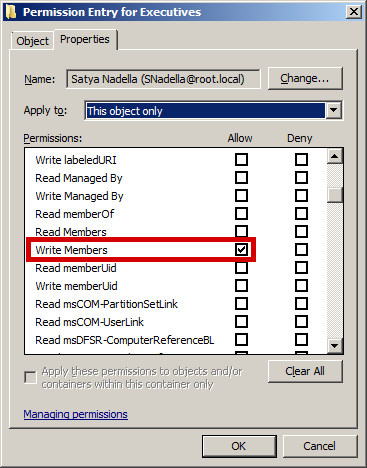
Find out / audit "who has Write-Property - Member (attribute) permissions on the security group."

Many will suggest that you can simply use tools like dsacls or acldiag, or simply write-up a PowerShell Script to do so, and most vendors will suggest using their Active Directory Permissions Audit tools. Sadly, and unbeknownst to them, they'd all be wrong!

In fact, they'd not just be wrong, they'd unfortunately be substantially wrong, and yet (and sadly,) this is exactly how most IT personnel at most organizations worldwide may be answering this question at their multi-billion dollar organizations today!

If you've been attending school diligently, then you know why this is not only the incorrect way to audit who can change group memberships in Active Directory, but also that if you use this approach to do so, you're going to end up with vastly inaccurate results, acting upon which could leave thousands of IT resources inadequately protected and thus vulnerable to compromise.

Here's why...


Now, the Correct Answer

If you've been attending school diligently, then by now you know that it is not "who has what permissions in Active Directory" that matters, but rather "who has what effective permissions in Active Directory" that matters. In fact, that is all that matters.

Thus, the correct answer is -

Find out / audit "who has Write-Property - Member (attribute) effective permissions on the security group."

Microsoft Effective Permissions Tab - Conceptually Correct Answer, But * Inaccurate and Inadequate

*Now, BEFORE you assume (and mistakenly and falsely so) that the Microsoft Effective Permissions Tab is sufficient to make this determination, please know that unfortunately not only is Microsoft's Effective Permissions Tab inaccurate, it is also substantially inadequate, as are all basic tools like dsacls, acldiag, PowerShell scripts etc. as explained in detail here and here.


I have already shared a substantial amount about Active Directory Effective Permissions, including why they are all that matters and why they are so difficult to accurately determine, which is also why the Effective Permissions Tab and virtually all other tools including dsacls, acldiag, PowerShell etc. just cannot be relied upon to accurately determine effective permissions.


To help organizational IT personnel worldwide understand this, let me share with you the only way that I know of, as former Microsoft Program Manager for Active Directory Security, to accurately audit effective permissions in Active Directory -


The snapshot above is that of the Gold Finger Active Directory Effective Permissions Calculator, which is the only tool that I know of that can correctly (i.e. accurately), automatically and adequately determine effective permissions in Active Directory.

As you can see above, we performed an Active Directory Effective Permissions Audit on a single domain security group called Executives, and we can see exactly who has Write Property - Member attribute effective permissions granted on this object.

I must mention that the only reason I have shared info about this tool here is to help everyone see exactly what it is they should be performing an audit of, and exactly what the output of such an audit looks like. You can download sample output from here.

I would encourage all organizations and IT personnel worldwide to compare the results of whatever method they might currently be using to make this vital determination on their domain security groups, with the results of a true effective permissions audit on their domain security groups. In all likelihood, in most cases the difference will be substantial, surprising and eye-opening.


Finally, Domain-Wide Assessment

Microsoft, there's an old saying that "Talk is Cheap." If I might add, "Actions are Not." If I were merely shedding light on this problem (as so many often do) without also doing something to help solve it, then I'd say the former saying would apply to me.

However, because I have the onus of representing the very best of not just Paramount Defenses, but also that of Microsoft (having been one of you), the onus of ensuring that I'm not just talking, is on me, so without further adieu, let me show you just how SIMPLE we have made the determination of such an important yet fundamental determination for the entire world.

If you can click a button, and I do literally mean just ONE button, you can now instantly, automatically and (most importantly) accurately find out exactly who can change the group membership of every single domain security group in an entire Active Directory domain, irrespective of whether it has 100 domain security groups or 100,000+ domain security groups -

Gold Finger - Active Directory Administrative (Privileged) Access and Delegation Audit Tool

Imagine that an organization has thousands of domain security groups. Within minutes, this tool can accurately determine effective permissions/access on each one of these thousands of domain security groups to determine and reveal exactly who can change their memberships, AND how they can do so. (In contrast, it would several thousands of hours to do this manually.)

Microsoft, this quite simply is the state-of-the-art when it comes to true effective access entitlement assessment in Windows based networks, and this is what can empower organizations worldwide to instantly identify (audit), lock down, and then verify (and of course subsequently audit on demand 365-24-7) that on every single domain security group in their Active Directory domain, only those individuals who should actually be able to change group memberships (and no one else) can do so.

If you wish to see the complete output of the above domain-wide effective access assessment, you can download it from here.

At so many of our customers worldwide, there are thousands of domain security groups in their Active Directory domains. Within minutes, they can instantly and accurately find out exactly who can change the membership of each one of their thousands of domain security groups, as well as find out exactly how these individuals are entitled to do so, and within just days, they have been able to completely lock down (and maintain secure) access on every single domain security group in their Active Directory.

To say that this is an eye-opening experience for them, would be to substantially understate its profound value and impact.

Note: Microsoft, as you can imagine, in the wrong hands, the same power could be used to obtain and potentially misuse extremely valuable cyber security intel (e.g. exactly who can change the membership of Domain Admins, Enterprise Admins, Built-in Admins, Executives, Employees, Contractors, Project X Confidential Access Group, Litigation Y Access Group, Next Innovative Product Z Group etc. etc.) This is why we do not indiscriminately license this tool. In fact, we only license it to organizations and only for use within their own environments.  


Something to Think About

Microsoft, in light of what I've just shared above, I'd like for you to give some serious thought to the following -


The need to know exactly who can change a domain security group in Active Directory is so basic, essential and fundamental to cyber security, yet even today, 17+ years after Active Directory was shipped, most organizations do not even seem to know how to do so correctly, let alone having the ability to do so correctly (, adequately, efficiently and on-demand.) Further, neither you, nor a single vendor (of which there are 1000s) in your global partner ecosystem have a single solution that can help the world fulfill this most basic, essential and fundamental cyber security need.

I can't help but wonder Why, and like I said, only one plausible explanation makes sense - this one (see "Here's Why" section.)


Summary

In summary, the primary objective of asking this simple question was to shed light on something that although may seem so very simple, is actually (not only) very important (but also very difficult to do correctly,) because it could possibly provide the easiest avenue for perpetrators to most easily compromise a substantially large number of organizational IT resources.


You see, in an Active Directory deployment, just about everything (i.e. all files, folders, email, SharePoint portals, applications, services, Intranet sites, remote access, Cloud access, Internet access, etc.) is ultimately protected by domain security groups.


Thus, if someone could change the membership of a domain security group in Active Directory, he/she could immediately obtain authorized access to every single organizational IT resource to which that domain security group is currently granted access.

This is why it is imperative to know exactly who can change the membership of all domain security groups in Active Directory.


The secondary objective was to help organizations worldwide understand that in order to correctly make this determination (i.e. to correctly find out who can change domain security groups in Active Directory), what they need to do is audit "who has what effective permissions" (i.e. this) and not "who has what permissions" on each single one of their domain security groups.

Finally, because "talk (alone) is cheap", I also wanted to share how easy we've made solving this problem for the entire world.


That's all for today.

Best wishes,
Sanjay


PS: Microsoft, I've some good news for you. Perhaps you may feel that I 've been a bit hard on you, but the good news is that Day-22 or so onwards, I'm going to show you and your customers just how rock-solid and trustworthy Active Directory is, how the world can easily attain and maintain least privileged access, and operate a bullet-proof Active Directory, so hang in there.

Wednesday, September 6, 2017

A Trillion $ Question to Microsoft regarding Domain Security Groups


Dear Microsoft,

Today is Day-15 of our Active Directory Security School for you. Since you may still be trying to grasp and comprehend the depth and complexity of what I shared with you on Day 14, I'll keep today's post/lesson really simple, short and to the point.


Domain Security Groups:  An All-Access Pass to 1000s of IT Resources

As you know, at the foundation of cyber security of most IT networks powered by Windows Server lies Active Directory.

As you may also know, in all such IT networks/infrastructures powered by Active Directory, one building block of cyber security in particular is extensively used to provision access to almost all IT resources in the network. Do you know which block it is?


Of course you do! In most IT networks powered by Active Directory, it is Domain Security Groups that are used to provision access to most organizational IT resources such as files, folders, SharePoint portals, Intranet sites etc. across the network!


In fact, in almost every Active Directory deployment in the world, today there exist 1000s of domain security groups within Active Directory that are used to provision secure access to almost the entirety of the organization's IT resources!


For anyone living on Mars, here are a few examples of such domain security groups -

  1. Domain Admins - A small but all-powerful group of privileged user that possess system-wide administrative access.

  2. All Employees - A large membership security group whose members include all organizational employees' accounts.

  3. Contractors - A medium-sized security group whose members may include the accounts of all existing contractors.

  4. Executives - A small security group whose members include all organizational executives' (e.g. C*Os) user accounts.

  5. <Resource-specific> Group - One of thousands of domain security groups that may be used to provision access on various IT resources for various business purposes. For example, Legal Team, R&D Team, Product X Group, etc.

In fact, today Active Directory domain security groups are used to aggregate (group) organizational users for the purpose of facilitating secure access to just about everything in a Microsoft Windows Server based network powered by Active Directory.

And by just about everything, I do mean just about everything - computers, files, folders, documents, emails, SharePoint portals, intranet sites, line-of-business applications, data, databases, VPN, remote access, web access ... <the list goes on and on.>

Thus, it is after all Active Directory domain security groups that help secure the entirety of the organization's IT resources!


Further, often a domain security group in Active Directory gates access to either a large or a highly-sensitive set of IT resources.

It thus logically follows that possibly the easiest way to obtain access to a specific IT resource (or 1000s thereof) that is(/are) protected by an Active Directory domain security group might be to literally just be a member of that domain security group!


Which Begs A Question

If by virtue of being a member of the a specific domain security group, one could instantly and automatically get access to all IT resources protected by the domain security group, then one cannot help but ask the simplest of cyber security questions i.e. -


Who can change the membership of a domain security group in Active Directory?

After all, if someone could modify the membership of a specific domain security group, such as All Employees, or Executives, or Secret Project "X" Staff , Project "Stratosphere" Source-Code Access Group etc., he/she could instantly obtain access to literally everything (i.e. all IT resources) that specific domain security group currently has access to, across the entire network!


A Simple Example

Perhaps this is best understood with a simple example, so here's a very simple one.

Consider that its Friday evening, and that a multi-billion dollar organization is going to announce their quarterly earnings on Monday at the close of the market. Further consider that this sensitive and highly confidential information (i.e. their Earnings) resides in a simple Microsoft Excel file titled Q3 2017 P&L, the only copy of which resides on a highly-protected server that's both physically located in their ultra secure data-center, and to which (server) all suspicious network access is monitored -


Now, consider that an intruder (funded by a wealthy nefarious entity) has been able to breach their perimeter and compromise a domain-joined machine and further has been able to ascertain that this specific file contains the information this entity has an interest in acquiring prior to Monday afternoon, because if they could access this information, they could possibly make $100M.

The intruder may not be able to obtain physical access to the server on which it resides, and he/she may not want to attempt trying to breach the security of the server over the network since all suspicious network activity is being monitored, (and for all Mimikatz fans, sadly no Domain Admin either has or is going to logon to the one machine you've compromised and now 0wn), so might there be an easier way for him/her to obtain access to this file?

Consider this! He/she may not be able to access the contents of the file but he/she can view its ACL, and thus he/she can see (as shown in the snapshot above) that the domain security group Executives has Full Control over this file. So, if he/she could somehow become a member of this domain security group (or compromise the user account of an existing member of this domain security group), he/she will be able to instantly (and in fact as far as the "System" is concerned, legitimately) access the contents of this high-value confidential file without any suspicion being raised anywhere or a single alarm going off anywhere!

In effect, his/her challenge has now been reduced to finding out exactly who can change the membership of the Executives domain security group, because if he/she can compromise the account of any one such individual, he/she would literally be a minute away from being able to change the membership of that group, and thus consequently obtaining access to that file!

In other words, the entire focus of attack just shifted from a highly secured IT resource to a single Active Directory object!

(In the interest of brevity, I'm not going to into further detail, but for those skilled in the art, the rest should be obvious.)


So, Microsoft, What's the Answer?

Dear Microsoft, you are a $550 Billion company today and one of the most important and valuable organizations in the world.


(You can take that as a compliment from the CEO of the most important and valuable cyber security company in the world.)


As you'll hopefully agree, since domain security groups help protect trillions of dollars in wealth worldwide today, the discussion and example above lead us back to and prompt one of the most simple and fundamental questions in cyber security -

Question: Who can change the membership of a domain security group in  Active Directory ? ( and ideally that of each domain security group in each one of 1000s of Active Directory domains of business and govt. organizations worldwide? )


Microsoft, you have now had 17+ years to demonstrate your deep expertise and thought leadership to the World in the vital Active Directory Security, Windows Security and the Cyber Security spaces, and you've spent Billions on it, so I ask you -

"Do YOU think this (i.e. the one above) is an important question for organizations to know the answer to, 
  and if so, can YOU please (at least) tell them HOW they can/should answer this question?!"


Oh, and since you're Microsoft, I have just one more question for you
(i.e. an opportunity for you to earn a few bonus points ;-) ) -

"Can YOU help them answer this question?"


That's it for today. The answer tomorrow on Day 16.

Best,
Sanjay


PS: See, I told you that today's would be a much simpler question than the previous one i.e. this one. Besides, if you've been attending your school regularly, by now you know that this is a rhetorical question that I've already answered many times over!


PS2: Microsoft, I may be a bit hard on you, but please know that I care deeply for you, and that you enjoy my goodwill. By the way, if I'm hard on you, its only because I feel that you had 17 years to educate your customers about this / this, yet you didn't, and likely as a result 1000s of organizations worldwide are blissfully operating in the dark, minutes away from compromise :-(